|
|

|
 |
![]()
Sound, Without the Fury
The Room, Part 6: Sound
By
Julie Hill
 Ask any company executive
about his technological dream room and chances are it will
include a number of display products – a brighter projector, a
plasma display, an interactive whiteboard and a
state-of-the-art videoconferencing system. But how many would
list echo-cancelling microphones or digital signal processing
(DSP)? Ask any company executive
about his technological dream room and chances are it will
include a number of display products – a brighter projector, a
plasma display, an interactive whiteboard and a
state-of-the-art videoconferencing system. But how many would
list echo-cancelling microphones or digital signal processing
(DSP)?
Ironically, sound has
always been the silent partner of visual technology. On one
hand, great sound isn't something one generally thinks about
during a presentation – if it's done right, that is. But
attend a presentation where the speakers are tinny, the sound
is bouncing around the room or you can't hear the speaker, and
sound quality suddenly becomes a major issue.
For those who want a world-class
conference room, audio components should be included in the AV
planning process, not tacked on as an afterthought. That's
because high-quality sound engineering requires taking into
account the room's architectural design, the function of the
space and the different demands that will be placed on the
presentation audio system.
Give me space
A proper sound system starts not with equipment,
but with the layout of the room itself. When an audio
specialist assesses a space, he does more than just look at
where the outlets are and decide where the speakers should go.
According to Brad Weber, a senior consultant at Atlanta-based
CDAI, one of the first things audio specialists do is
scrutinize the layout of a room. "The electronics and room
acoustics need to be interrelated, and must work together,"
explains Weber. "They need to be designed that way – to work
together – otherwise they are always fighting each other."
This is one of the reasons it's
important that the sound component play a role in the
architectural design of the room, he says. "Most companies
know they want good speakers and microphones. You can spend a
lot of money on top-of-the-line electronics, but if the room
is bad acoustically, it will still show."
The right mix
A room well-designed for sound should generally
consist of a mix of surfaces, with some that allow the sound
to bounce and some that absorb sound waves. Hard surfaces such
as glass, hardwood floors, stone, tile or mirrors tend to
reflect or bounce sound waves. Some bouncing is needed,
however, to ensure that people can hear what's being said. But
too many hard surfaces cause the sound waves to crash into
each other, distorting the sound. Some surfaces that absorb
sound, such as heavy curtains, acoustical panels and
overstuffed chairs, help control distortion. But again, too
much of a good thing can cause problems. Too many absorption
factors can leave a room with dead spaces or make the sound
"flat," regardless of how good the speakers and microphones
are.
 |
|
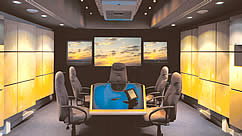
Attention has been paid to how sound reflects off
the surfaces in this well-designed meeting room. The
walls are designed to baffle sound and most of the audio
components are hidden. |
| Innovations in sound
products have allowed integration companies to solve some
room-acoustic issues with ingenious gadgetry, but don't count
on this to save your facility from poor room design. "Audio
technology continues to get better and better, giving us some
flexibility in fixing these problems, but starting with a good
room is still important," Weber says.
Function factors
In addition to architectural concerns, it's
important for a sound specialist to know how a room will be
used. If the room will be used mainly for presentations, it
requires a different setup than a room used for
videoconferencing. Who will be using the room and the depth of
their technical experience are also factors. And sometimes
it's a matter of convincing clients that what they want is not
necessarily what they need.
The
trend toward "surround sound" is one example, says Weber. Many
executives are convinced they need surround sound, and Weber
admits there is a place for this technology, such as the
advertising firm that uses its boardroom to show clients
potential commercials, or the sales firm that regularly
incorporates high-tech multimedia presentations. In these
cases, surround sound makes sense. But if your company relies
heavily on PowerPoint presentations, "You don't have to have
surround sound, because you won't get anything out of it,"
says Weber. "The vast majority of PowerPoint presentations do
not use surround sound, so it's not a good investment."
The video difference
As little as 10 years ago, filling a
room with robust sound was all that really mattered. But today
the additional audio demands of videoconferencing change the
whole sound dynamic in a room. According to Brett Sandgren,
vice president of New York City-based Audio Command, "Adding
videoconferencing usually means that the company must revisit
the entire system and scrutinize its design, seating,
lighting, window treatments and yes, audio."
Unlike presentation audio, videoconferencing
systems need more microphones, more speakers and the ability
to regulate live audio to ensure that all participants can
hear and speak as needed. "With audio for conferencing, you
don't need the high fidelity of a surround system," says
Sandgren, "but it does need to be evenly distributed
throughout the conference room." It's important to take into
account any other sound sources in the room, he adds.
Seemingly innocuous sounds such as the fan noise from a
projector or the hum of a building's heating system can be
picked up by the sensitive microphones used for
videoconferencing, so be aware of those possibilities.
Weber agrees, adding that it's also
important to find out how many people regularly participate in
the room's videoconference calls as well as how many will
actually be speaking. "There are many cases in which the
client says we need to videoconference for 25 people, but it's
actually 23 listening to what the CEO and CFO present," he
says. "That's important to know because it's easier to deal
with microphones for two people than for 25."
Ready to play
To get optimal sound quality,
specialists say it's important to pay as much attention to the
audio facet as any other component of the presentation room.
With the right mix of room acoustics, speakers, microphones
and specialized audio equipment, it is possible to design a
room that can produce crystal-clear videoconference meetings
as well as stunning multimedia sound for all kinds of
presentations.
Julie Hill is managing editor of
Presentations.
Originally published in the June 2002 issue of
Presentations magazine. Copyright 2002, VNU Business
Media.
Other articles from the series "The Room":
Introduction
The
Big Wow (The Room: Executive Meeting Centers)
Shhh,
We're in a Collaboration (The Room: Collaboration)
Putting
It All Together (The Room: Systems Integration)
The
Latest Picture Show (The Room: Display &
Projection)
The
VC Factor (The Room:
Videoconferencing) | |
|
|
|