|
|

|
 |
![]()
The VC Factor
The Room, Part 5:
Videoconferencing
By Stephen Regenold

A 21st-century presentation room isn't
complete without videoconferencing capability, but how do
you determine if it's a wise investment for your company or
organization? When Elroy Jetson needs
permission for an intergalactic field trip, he dials his mom
Jane from the Little Dipper School's videophone and is
instantly connected. There are no complicated dialing
procedures. There are no bumps or jitters. And Elroy
definitely doesn't have to think about whether his call should
go over ISDN lines or an IP network. Furthermore, the
connection is perfect – natural voice and intonation, clear
picture and a setup so simple a 10-year-old boy could manage
it while sucking on a space soda.
 |
|
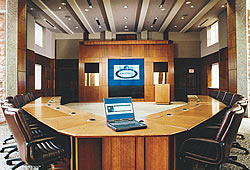
When a room will be used for videoconferencing,
the sightlines from the camera to participants' faces is
a critical design consideration. This University of
Toronto conference room, designed for group
video-conferencing, has cameras positioned above and to
each side of the front screen. |
|
Unfortunately for the entire videoconferencing
industry, this image of the Jetson's futuristic videophone has
stuck in America's cultural consciousness. People want their
communication technology to be this effortless and
trouble-free, so expectations are high for engineers who must
design idiot-proof systems equipped with enough features to
suit tech-savvy business users.
VC's slow evolution
For myriad reasons, videoconferencing's evolution –
and thus acceptance – has been slow. Legacy roll-about systems
with high connection costs, Web-cams with choppy video and
other IP-based products that gobble up too much bandwidth have
created an impatience with the industry that isn't completely
unjustified. Waiting for videoconferencing to deliver on its
promises has been like driving in the desert toward a mountain
– it always looks a lot closer than it is.
The good news is that videoconferencing's stars do
seem to be lining up at last. Vast broadband networks are now
common at most businesses and videoconferencing over IP is
quickly gaining on traditional ISDN setups. Products have been
tweaked and refined to better accommodate data-sharing and
presentations over the videoconferencing medium. And as a
society, especially in light of recent cut-backs on business
travel, we are beginning to embrace videoconferencing.
For all these reasons and more, an
up-to-date presentation room is expected to have
videoconferencing capability. Along with an electronic
whiteboard, an audioconferencing system and a data projector,
a videoconferencing setup has become one more tool in the
presenter's arsenal.
If your
presentation room is behind the times from a
videoconferencing-equipment standpoint, or does not yet have a
system, read on to see what the experts recommend. The
following suggestions, plus a few adjustments to your
technology budget, should get the videoconferencing system in
your room up to spec – even by Elroy Jetson's standards.
Where to start
According to Dennis Murphy, vice
president of operations and technology at Columbia, Md.-based
AV integrator SPL Integrated Solutions, the first thing a
company should do when planning for a videoconferencing system
is assess the anticipated return on investment (ROI). Yes, the
system will take some money to get it up and running, but the
cost savings and efficiency gains in other areas should more
than offset the up-front costs over the long haul.
Murphy cites a major manufacturing
company with which SPL recently contracted. The company held
monthly sales meetings at its East Coast headquarters and
required a handful of executives to travel there every month.
After looking into the videoconferencing alternative and
running the ROI figures, the company concluded that replacing
some of those meetings with multisite videoconferences would
save on travel costs and free up its executives' time for
other projects.
Settle on a
system
Once you've
determined that videoconferencing will be a component in the
presentation room, it's time to select a system. Most
companies work with a systems integration firm when installing
a more substantial videoconferencing setup, and many
integrators have their favorite systems in the bag and ready
to go. However, a bit of research and a quick survey of your
company's situation will help you identify the best system for
your company's needs.
A good
place to start is with a questionnaire. This document should
include sections on how many locations you want to
videoconference from, the details of your company's network,
how many people will likely participate in each
videoconference, and how important presentations will be in
the videoconferencing setting. If you don't ask these
questions of your company, a systems integrator will – but
it's best to be prepared before meeting with an integrator to
make sure you know what your needs are.
From there, it's a matter of working with the
integrator or videoconferencing hardware provider to choose
the best setup. A small firm with a stellar IP network may
install an all-in-one system with codec, camera, monitor and
microphone set in a slim, wall-mounted box. A Fortune 500
company upgrading its global videoconferencing infrastructure
will likely roll in a dual-screen unit hardwired into its
well-used ISDN network or pump the videoconference signal
through an existing or newly added videowall.
Lights, camera and more
Getting the hardware installed is
only one part of the process, though. From there, the room has
to be technologically tweaked in a number of other ways to
accommodate videoconferences effectively. Lighting, audio and
seating issues are major concerns. Also, extras such as
integrated presentation hardware, room aesthetics and
additional networking considerations must be assessed.
Last fall, the University of Toronto
was finishing up a $1.5 million presentation room when it
encountered a big problem with the videoconferencing
component. The problem did not stem from anything technical,
but rather from a conflict with the architect's creative
vision for the room.
The room,
which is now the centerpiece of the university's high-tech
facilities, was designed with 16-foot-high windows that arched
around the entire back wall. The state-of-the-art
videoconferencing cameras could not compete with the sunny
backdrop, so the university had to make some drastic changes.
To start with, the main table was moved to better accommodate
the cameras. Next, solar blinds were installed over the
windows for quick room-dimming. A powerful lighting system was
also installed to brighten speakers' faces for the cameras.
Once the lighting situation was
corrected, the university continued to enhance the
presentation room. Three direct satellite feeds were installed
to accommodate press events and live TV broadcasts, and a
fiber-optic connection was put in place so the news media
could do direct feeds back to their studios. For easier
administration, a Crestron room-control system was added and a
20-speaker audio system was installed for optimal sound.
Cost-cutters
If you're just looking for basic
videoconferencing, many of the extraneous costs can be cut. In
fact, stripped to its bare bones, a videoconference can be
performed with a computer, a USB Web-cam and freeware.
However, most companies strive for the middle ground when
installing videoconferencing in the presentation room,
gravitating toward systems that range from about $5,000 to
$15,000.
SPL's Dennis Murphy
recommends that if the integrator comes back with a bid too
high for your budget, look at cutting peripherals first.
Opting not to include DVD players, gas plasma displays, LCD
screens, extra lights and speakers, or other nice-to-haves can
dramatically drop the price. "Not everyone is going to need
the dual-screen plasma unit in their presentation room," says
Murphy. That's $10,000 to $20,000 in savings right there.
Training time
After the system is running
smoothly, make sure your staff is trained to use the new tool.
Many videoconferencing systems are underused because staff
members are not properly trained. Next, make sure at least one
of your IT professionals becomes conversant with the
videoconferencing equipment and software, as well as the
network that carries the system.
From there, it's up to you to bring people into
videoconferences and show them the benefits. If you want to
upgrade down the road, be sure to document the cost savings in
deferred travel, better time management and other efficiencies
so you can show the powers that be the bottom line. If the ROI
is there, support for the system will likely follow.
Stephen Regenold
is an associate editor of Presentations magazine.
Originally
published in the June 2002 issue of Presentations
magazine. Copyright 2002, VNU Business Media.
Other articles
from the series "The Room":
Introduction
The
Big Wow (The Room: Executive Meeting Centers)
Shhh,
We're in a Collaboration (The Room: Collaboration)
Putting
It All Together (The Room: Systems Integration)
The
Latest Picture Show (The Room: Display &
Projection)
Sound,
Without the Fury (The Room:
Sound) | |
|
|
|